Phishing Emails: The Complete Guide to Spotting and Avoiding Scams
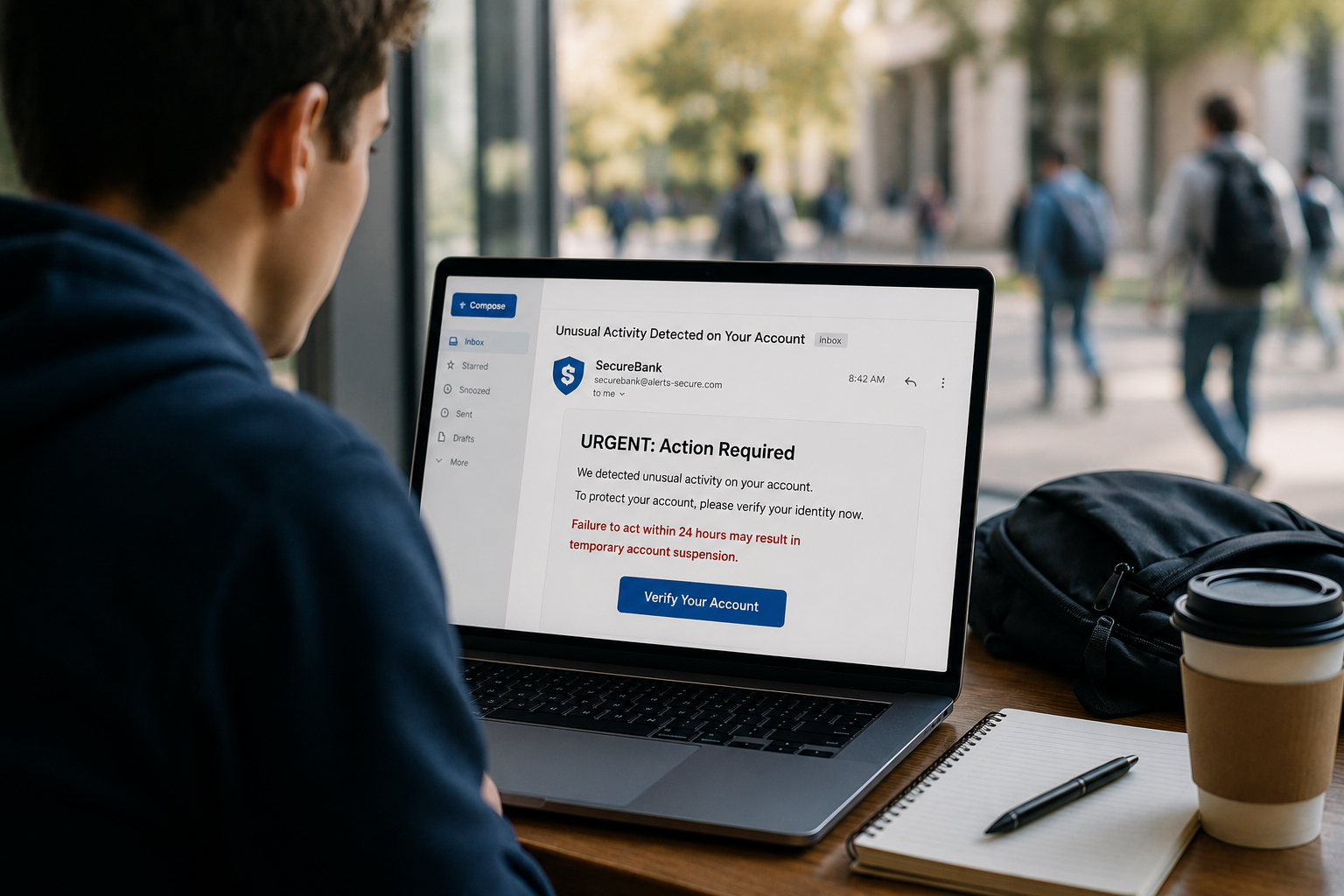
A college student checks their inbox before heading to class and sees an urgent message from their bank. The email warns of suspicious activity and demands immediate action to prevent account closure. The logo looks right, the language sounds official, and the pressure feels real. It isn’t. It’s a phishing email, and it’s one of millions sent every single day designed to do exactly what this one almost did: trick a busy, distracted person into clicking before thinking.
Phishing remains the single most common way attackers get into an account, a network, or a bank balance that isn’t theirs. Estimates consistently put phishing behind the majority of successful breaches, not because people are careless, but because the messages are built specifically to bypass careful thinking in the moment it matters most. Understanding how these emails actually work, and building a small set of habits that catch them, closes off the easiest entry point attackers have.
What a Phishing Email Actually Is
Phishing is an email (or text, or social media message) designed to trick you into clicking a malicious link, downloading a malicious file, or handing over information like a password, account number, or one-time code. The word is a deliberate play on “fishing”: attackers cast a wide net, using a lure convincing enough that some percentage of recipients will bite.
The average person receives multiple phishing attempts every week. Most get deleted without a second thought. The ones that succeed are the ones built well enough, or timed well enough, to slip past normal defenses. That’s the real threat: not obvious spam, but the message that looks close enough to legitimate that hesitating feels unnecessary.
The Red Flags That Still Work
Some warning signs remain reliable even as scams get more sophisticated. Look for these first.
Urgency and pressure. “Your account will be suspended in 24 hours.” “Immediate action required.” “Failure to respond will result in…” Legitimate organizations rarely demand instant action without giving you a reasonable path to verify the request first. Manufactured urgency exists to short-circuit careful thinking, and it’s one of the most consistent tells across almost every phishing campaign.
Mismatched sender details. The display name might say “Chase Bank,” but the actual email address behind it is something unrelated. Always check the full sender address, not just the name shown by default, and look closely for near-miss domains (a single swapped letter, an extra word, a different top-level domain than the real company uses).
Generic greetings on messages that claim to be personal. “Dear Customer” or “Dear User” from an organization that would normally use your name is worth a second look, especially paired with a request for sensitive information.
Links that don’t match their destination. Hover over any link before clicking (on desktop; on mobile, press and hold) to see the actual URL it points to. If the visible text says “Sign in to your account” but the underlying link goes somewhere unrelated to the company’s real domain, that’s the message revealing itself.
Requests for information a legitimate sender would never ask for over email. Banks, IT departments, and most companies will never ask you to email or text your full password, PIN, or one-time authentication code. If a message asks for that directly, treat it as fraudulent by default.
Attachments you weren’t expecting. An unexpected invoice, shipping notice, or “important document” from an unfamiliar sender is a common malware delivery method. When in doubt, don’t open it, verify through another channel first.
A Real-World Example: The Fake Bank Alert
Walking through a realistic scenario makes the pattern easier to recognize in the moment.
The email arrives looking legitimate: correct logo, professional formatting, the bank’s typical color scheme. The subject line reads “Unusual Activity Detected on Your Account.” The body explains that a suspicious transaction was flagged and asks you to verify your identity immediately by clicking a link and confirming your login details, or risk having the account frozen.
Everything about the surface presentation is designed to reduce suspicion. The habit that catches it: don’t click the link in the email at all. Instead, open a new browser tab, type the bank’s actual web address directly (or use the bank’s official app), and log in there. If there’s a genuine issue with the account, it will show up when you log in through a channel you initiated yourself. If nothing shows up, the email was fake.
This single habit, going directly to the source instead of following a link in an unsolicited message, defeats the overwhelming majority of phishing attempts regardless of how convincing they look, because it removes the attacker’s ability to control where you actually land.
Why Millions of People Still Fall for It
Despite widespread awareness campaigns, phishing continues to work at scale. A few reasons why:
Volume creates inevitability. When millions of phishing emails go out, even a very low success rate produces a large number of victims. Attackers don’t need to fool everyone; they need to fool a small percentage of a very large number of targets.
Distraction, not ignorance, is the real vulnerability. Most people who fall for phishing know, in the abstract, that scams exist. What gets them is checking email quickly between meetings, while tired, or while multitasking, exactly the conditions phishing emails are designed to exploit through urgency and pressure.
Legitimate messages have trained us to comply quickly. Companies really do send account alerts, password reset requests, and shipping notifications. Years of legitimate versions of these messages have built a habit of quick compliance that phishing emails exploit directly.
The messages keep improving. Professional copywriting, authentic branding, and psychological manipulation tactics have become standard in phishing campaigns, not just in sophisticated targeted attacks but in the mass-market versions that hit ordinary inboxes.
Simple Habits That Work, No Technical Background Required
Effective phishing prevention doesn’t require a computer science degree or specialized software. A handful of consistent habits close off most of the risk.
Go to the source directly instead of clicking links in unsolicited messages. This is the single highest-value habit on this list. Type the company’s website address yourself, or use their official app, rather than trusting a link in an email or text.
Slow down when a message creates urgency. Urgency is a manufactured signal, not a genuine one. If a message is pushing you to act immediately, that pressure itself is worth treating as suspicious.
Verify unusual requests through a second channel. If an email claims to be from your boss, your bank, or a coworker and asks for something unusual (a payment, a password, sensitive information), confirm it through a phone call or a separate, independently-found contact method before acting.
Check the actual sender address, not just the display name. This takes five seconds and catches a large share of spoofed messages immediately.
Use multi-factor authentication everywhere it’s offered. Even if a phishing email successfully captures a password, multi-factor authentication (a code from your phone, a security key, an authenticator app) usually stops the attacker from actually getting into the account.
Report suspicious emails instead of just deleting them. Most email providers and workplace IT teams have a reporting mechanism. Reporting helps improve filtering for everyone else and, in a workplace setting, helps security teams see patterns across multiple targeted employees.
Don’t feel embarrassed if you almost click. Everyone gets a convincing phishing email eventually. Attackers spend all day refining these messages against a target audience of ordinary, busy people; nearly falling for one isn’t a reflection of carelessness, it’s a reflection of how well-designed the message was.
Building the Instinct, Not Just the Checklist
The habits above work best when they become automatic rather than a mental checklist you consciously run through every time. That instinct develops the same way any habit does: through repetition and a moment of pause before acting on any message that asks you to click, log in, or send something.
The single question worth internalizing above all others: did I ask for this, or did it arrive unprompted asking something of me? Unprompted messages requesting action, especially urgent action involving money, credentials, or sensitive information, deserve independent verification before you comply. That one habit, applied consistently, is the most reliable defense against phishing that exists, regardless of how sophisticated the message looks.
Enjoyed this article?
Subscribe to Professor Simon's weekly newsletter for practical insights, career guidance, and leadership lessons delivered every Friday.
A confirmation email will be sent. If you don't receive it, please check your spam or junk folder.
No spam. Unsubscribe anytime.
Prefer to Listen?
Listen to Professor Simon’s IT & Cybersecurity Podcast for practical conversations about cybersecurity careers, certifications, security leadership, and real-world lessons from the field.
Listen on Spotify